
Apni Pathshala VED | Operational Standard Operating Procedure
| Control Parameter | Record Detail |
|---|---|
| SOP Title | Media Library & Digital Asset Management |
| Document ID | SOP-VED-MED-2026-005 |
| Version | v1.0 |
| Effective Date | Sep 04, 2026 |
| Target Audience | POD Leaders, Media/Content Coordinators, Marketing Teams, & Technical POM Team |
| Platform URL | Apni Pathshala VED (https://ved.apnipathshala.org) |
1. Purpose & Scope
This Standard Operating Procedure (SOP) provides POD Leaders, Content Coordinators, and Technical Team members with a structured operational framework for uploading, categorizing, organizing, and managing digital assets (photos, videos, success stories, pod buzz videos, and official documents) within the Apni Pathshala VED ecosystem.
It covers direct object-storage presigned uploads, media tagging, quota management, and access governance across all active POD centers.
2. System Access & Navigation
Authorized personnel must follow these steps to access the Media Library:
- Navigate to the VED Portal: Open a web browser and go to https://ved.apnipathshala.org/login.
- Authenticate Credentials: Sign in using authorized credentials (assigned POD Leader or Content Coordinator role).
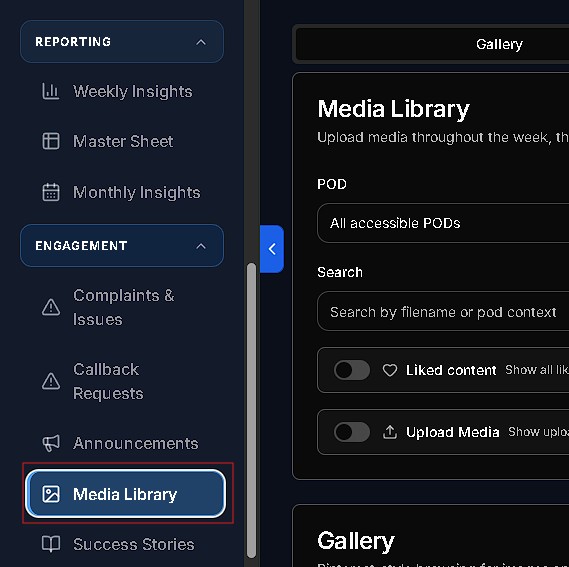
- Navigate to Media Module: Locate the Content & Media section in the left navigation sidebar and select Media Library.
- Direct Route: https://ved.apnipathshala.org/app/media-library
3. Asset Classifications & Storage Limits Matrix
The following table outlines the supported asset categories, accepted file formats, maximum size thresholds, and storage policies enforced within VED:
| Asset Category | Description & Usage | Allowed File Formats | Max File Size Limit | Storage & Access Policy |
|---|---|---|---|---|
| POD BUZZ VIDEO | Short highlight videos of center activities & events | MP4, MOV, WEBM | 150 MB – 500 MB | High-bandwidth CDN streaming |
| MEDIA LIBRARY | General photos, event coverage, center images | JPEG, PNG, WEBP, HEIC, HEIF | 15 MB per image | Direct Object Storage (S3 / R2) |
| SUCCESS STORIES | Student testimonials, achievement clips & graphics | MP4, MOV, JPEG, PNG | 150 MB (Video) / 15 MB (Image) | Public / Website Publishing Allowed |
| POD DOCUMENTS | Center agreements, NOCs, layout plans, SOPs | PDF, DOCX, XLSX, CSV | 25 MB per document | Restricted Role Access |
| USER AVATAR | Profile photos of staff, trainers & students | JPEG, PNG, WEBP | 5 MB per image | Optimized thumbnail caching |
4. Operational Workflows
Workflow 1: Direct Uploading Assets to Media Library
When uploading single or batch media assets to VED, follow this procedure:
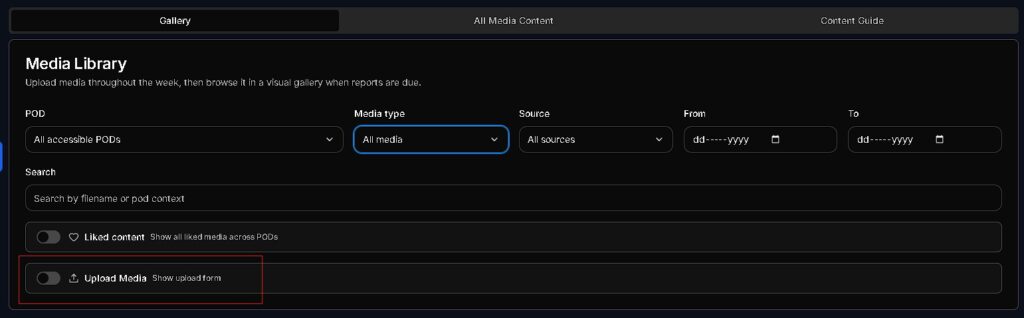
- Access Upload Zone: Navigate to Media Library (/app/media-library) and click the + Upload Media button.
- Select Upload Category: Choose the target asset category (MEDIA_LIBRARY, POD_BUZZ_VIDEO, SUCCESS_STORIES, or POD_DOCUMENTS).
- Assign Metadata & Tagging:
- Select the associated POD Location.
- Input descriptive tags and title (e.g., “Science Fair Exhibition 2026” or “POD Buzz – Weekly Highlights”).
- Initiate Direct Object Storage Upload:
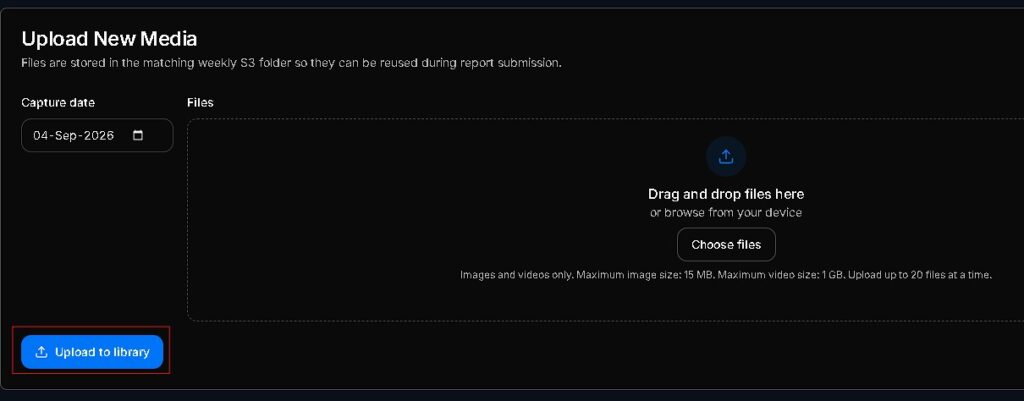
- Drag and drop your media files into the designated upload area.
- The platform requests a direct presigned URL from Cloud Storage (S3/Hetzner/R2).
- Track progress via the live progress bar. Files stream directly from your browser to secure object storage without straining application servers.
- Finalize Session: Click Save Asset Metadata to lock the upload session and publish the media to the POD library.
Workflow 2: Managing & Publishing Content Highlights
To promote center activities and share highlight clips with the central website team:
- Navigate to Content Highlights: In the Media Library, select the POD Buzz / Success Stories tab.
- Review & Tag Content:
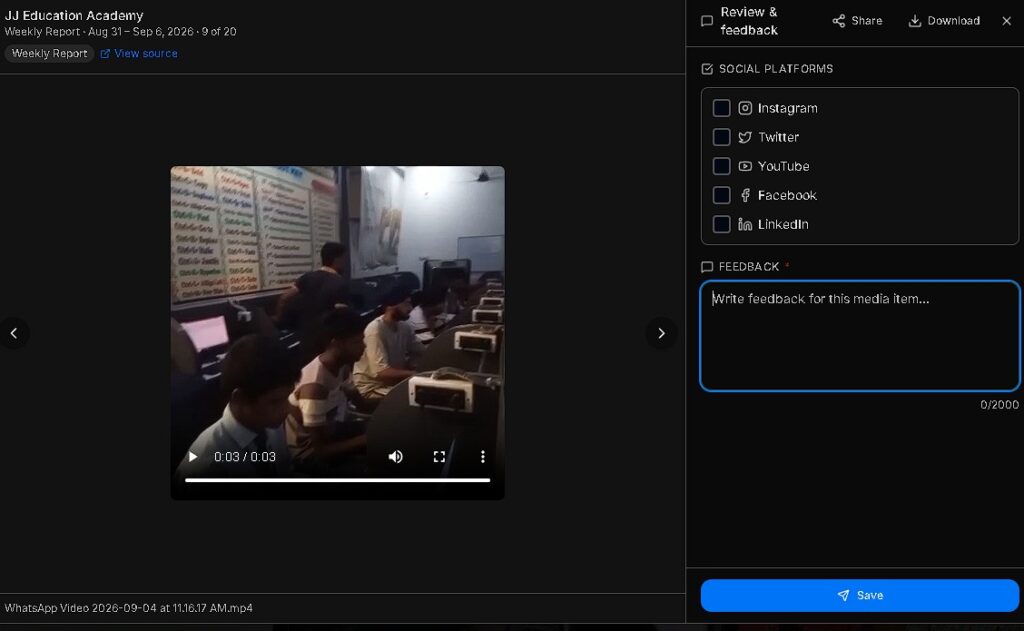
- Click on any uploaded video or image card to preview media playback.
- Edit caption, student attribution, and event details.
- Configure Visibility & Website Sync:
- Toggle visibility status between INTERNAL_ONLY (center staff only) and PUBLIC_WEBSITE (eligible for website showcase).
- For PUBLIC_WEBSITE items, the system automatically generates high-speed CDN delivery URLs for website embedding.
- Archive or Replace Assets: If a video or photo needs updating, click Upload Replacement, then mark the older asset as Archived.
Workflow 3: Organizing Folders & Storage Governance
Maintain clean media organization and adhere to storage quotas across POD locations:
- Filter Assets: Use the top filter bar to sort media by POD Name, Date Range, or File Type (Images, Videos, Documents).
- Generate Presigned Links:
- Click the Share Asset icon next to any document or media item.
- Select expiration duration (e.g., 24 Hours, 7 Days).
- The system generates a secure, time-bound presigned download link.
- Storage Quota Audit & Cleanup:
- Center leads must review monthly storage usage under the Storage Governance dashboard.
- Delete duplicate, blurred, or obsolete draft media to ensure compliance with assigned POD storage caps.

5. Best Practices & Media Quality Guidelines
- High Visual Quality: Ensure photos are well-lit and in sharp focus. Avoid uploading blurry, underexposed, or dark images.
- Privacy & Consent: Verify student media consent records before setting visibility tags to PUBLIC_WEBSITE.
- Format Optimization: Convert raw camera formats (RAW, TIFF) to JPEG or WEBP before uploading to conserve bandwidth.
- Descriptive File Naming: Use clear, standardized file names (e.g., POD12_Robotics_Workshop_01.jpg) instead of default camera names (e.g., IMG_0042.jpg).
6. Support & Technical Assistance
- Media & Website Publishing: For website content placement queries, contact the Website Content & POM Team via the VED communication hub.
- Portal & Infrastructure Technical Issues: If media uploads fail, presigned links expire prematurely, or storage quotas freeze, click the Request Support Call button on the VED portal dashboard.


