Skip to content
Picture of ApniPathshala Logo Primary
  • Start A Pod
  • Pods
  • Apna PC
  • What We Do
    • Stories
    • Comics
    • Courses
  • Blogs
  • Live Map
  • Start A Pod
  • Pods
  • Apna PC
  • What We Do
    • Stories
    • Comics
    • Courses
  • Blogs
  • Live Map
What’s new
View all updates
Picture of ApniPathshala Logo Primary
What’s new
View all updates

Search

cancel

Notifications

  • Collaboration with NCSM
  • Read, How a small POD is changing lives
  • Read, Pros and Cons of Homeschooling
  • Read, Microschooling a new way to learn

Suggestions

Non - Profit PODs
Apna PC
POD Manual
How to start a POD?
What is a POD?
Mumbai
Delhi
What is a Microschool?
Instagram
Apply to open a POD

Follow Us:

Facebook X-twitter Youtube Instagram Phone-alt Envelope

Need Help?

  • How to Apply for a POD
  • What is Apni Pathshala?
  • Understanding the Incubation Phase
  • Weekly Responsibilities During Incubation
  • Monthly Responsibilities During Incubation
Picture of ApniPathshala Logo Primary
cancel
  • Home
  • Start A Pod
  • Pods
  • Apna PC
  • Blog
  • Comics
  • Courses
  • Dr. Malpani’s Insights
  • Student Stories
  • Live Map
  • About Us
  • Contact Us
  • Home
  • Start A Pod
  • Pods
  • Apna PC
  • Blog
  • Comics
  • Courses
  • Dr. Malpani’s Insights
  • Student Stories
  • Live Map
  • About Us
  • Contact Us
Facebook X-twitter Youtube Instagram Phone-alt Icon-email1

POD Operating Manual

Getting Started

2
  • How to Apply for a POD
  • What is Apni Pathshala?

POD Operations for POD Leaders

34
  • SOP: Student Data Management & Attendance Tracking
  • SOP — Managing POD Inventory & Equipment
  • SOP — How to Log Complaints & Request Tech Support
  • SOP — How to Log Complaints & Request Tech Support
  • SOP — How to Manage Courses & Curriculum | POD Leader Guide
  • SOP — How to Submit Weekly Insights | POD Leader Guide
  • Standard Operating Procedure — Student Data Management & Learning Portal Sync
  • Standard Operating Procedure — Media Library & Digital Asset Management
  • Standard Operating Procedure: Complaints & Technical Support Management
  • SOP — Success Stories | POD Leader Guide
  • Complaint Submission SOP
  • SOP — How to Fill Weekly Insights | POD Leader Guide
  • SOP — How to Fill Monthly Insights | POD Leader Guide | Apnipathshala POM
  • Configure Innovative Teaching Methods in Apni Pathshala PMS
  • Submit Student Success Stories Using Apni Pathshala PMS
  • How to upload weekly report on PMS
  • Skill Development Cluster
  •  Employment Cluster – Definition Structure
  • Digital Literacy Cluster – Definition Structure
  • Academic Empowerment Cluster Definition Structure
  • One-Year POD Standard (Aligned to AP Phases 0–3)  
  • Post-KYC Meeting with the POD
  • SOP: Software Testing Before POD Launch
  • SOP for New POD Applications (Complete, Priority-Arranged)
  • Curriculum Assessment & Design for PODs
  • Shipment, Delivery & PC Setup Guide
  • How to Raise a Hardware Complaint
  • Red Flags and Corrective Actions
  • Usefull Tools and Templates
  • Final Evaluation of Incubation
  • Core Evaluation Criteria
  • Monthly Responsibilities During Incubation
  • Understanding the Incubation Phase
  • Weekly Responsibilities During Incubation

ApniPrerna

5
  • Deleting Old or Unused User Accounts
  • Deleting Unwanted Applications
  • How to Create Student Login Credentials in Apni Prerna
  • How to Install Apni Prerna Software on a Windows PC
  • SOP: Installation of Apni Prerna on Linux PCs 
View Categories

SOP — Managing POD Inventory & Equipment

Apni Pathshala VED | Standard Operating Procedure

Target Audience: POD Leaders, Coordinators, & Trainers
Platform: Apni Pathshala VED (https://ved.apnipathshala.org)
Version: v1.0
Last Updated: Aug 25, 2026

Purpose

This Standard Operating Procedure (SOP) provides POD Leaders with a structured framework for managing physical inventory, inspecting hardware, reporting damages, recording shipments, and conducting regular asset audits within the VED ecosystem.

System Access

  1. Navigate to the VED Login Portal (https://ved.apnipathshala.org/login).
  2. Log in using your authorized credentials.
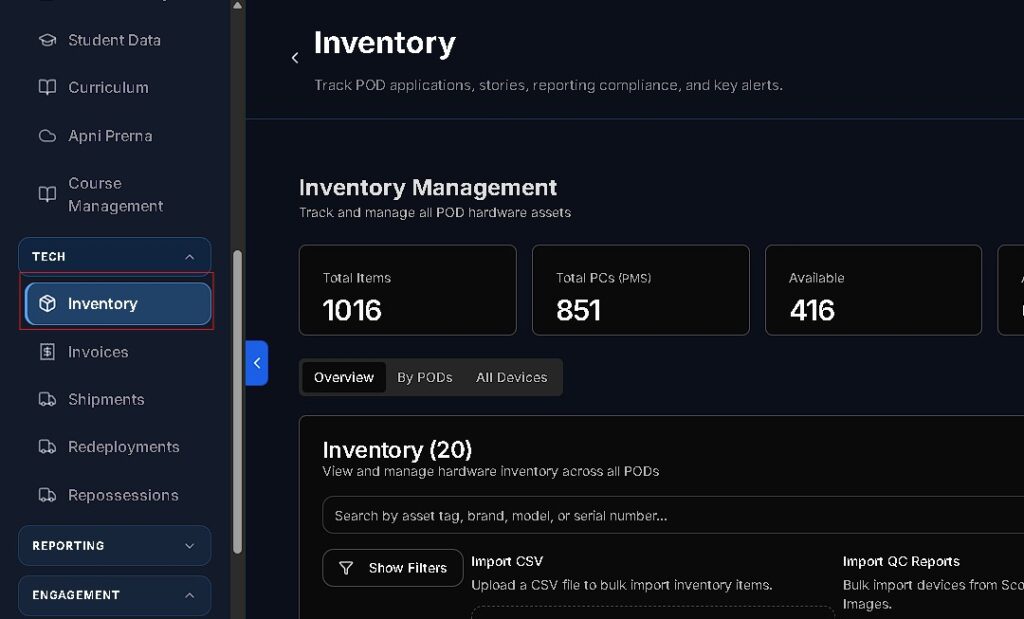
  3. Locate the Inventory module in the left sidebar navigation under the Tech category.
Inventory Classifications

The following table outlines the specific categories tracked within the VED platform that POD Leaders are responsible for maintaining.

CategoryTypical Items Included
Computing HardwareCPUs, Monitors, Keyboards, Mice, Headphones, Webcams
Power & NetworkMain UPS Units, Extension Boards, Wi-Fi Routers, Ethernet Cables
Facility FurnitureTables, Chairs, Whiteboards, Storage Cabinets
Learning MaterialsPrinted Worksheets, Textbooks, Stationery Kits

Workflow 1: Monthly Inventory Audits

POD Leaders must conduct a full audit of all physical assets once per month to ensure data accuracy.

  1. Access Audit: Navigate to Inventory (/app/inventory) and click Start Monthly Audit.
  2. Asset Verification: For every item listed, perform the following:
    • Condition Check: Assign status as Working, Minor Fault, or Non-Functional.
    • Tag Verification: Cross-reference the physical sticker (e.g., MON-POD12-04) with the ID in VED.
    • Serial Updates: Record serial numbers for any newly assigned or replaced equipment.
  3. Discrepancy Reporting: If items are missing or damaged, select the appropriate status and provide a concise note (e.g., “Mouse cable damaged by rodents”).
  4. Finalization: Click Submit Inventory Audit to lock the records for the month.
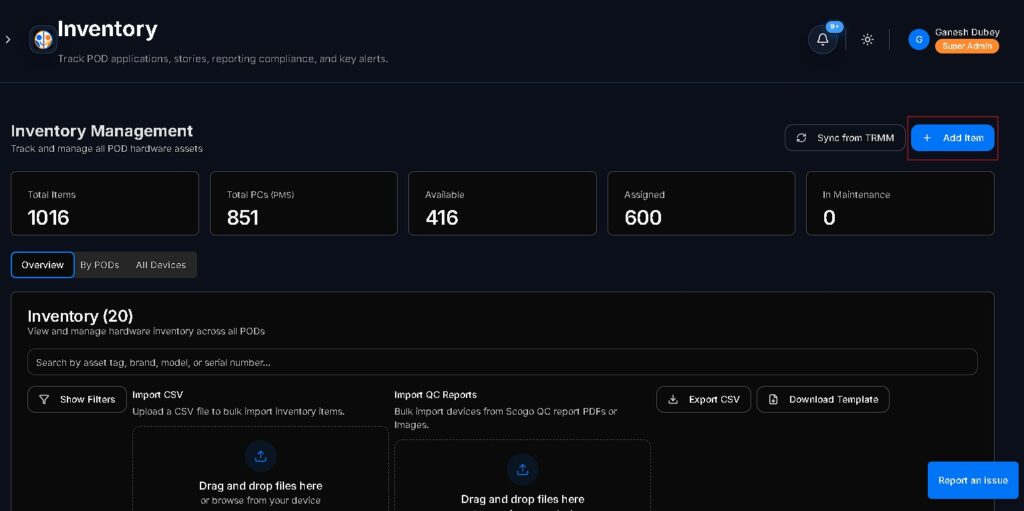
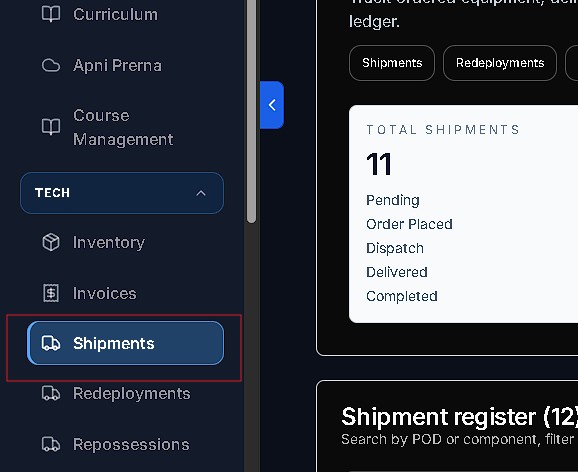
Workflow 2: Receiving Shipments & Evidence Upload

When new equipment or replacements arrive, follow these steps to ensure proper asset onboarding.

  1. Locate Shipment: Navigate to Shipments (/app/shipments) and select the entry matching your tracking number.
  2. Preliminary Inspection: Inspect the external boxes for seal tampering or transit damage before opening.
  3. Visual Documentation:
    • Unboxing Video: Record a continuous video showing the seal being broken and the initial equipment inspection.
    • Photography: Capture clear photos of the serial numbers printed on the boxes.
  4. Confirmation: Click Confirm Delivery Received and upload the video alongside the signed Delivery Receipt (QC Document).
  5. Auto-Update: The system will automatically move these items into your active POD Inventory.
Workflow 3: Reporting Damage & Replacements

If hardware fails during daily operations, initiate a report immediately.

  1. Select Item: In the Inventory tab, click on the specific item needing attention.
  2. Initiate Report: Click Report Damage.
  3. Damage Specification:
    • Type: Select from options like Cable Snapped, Screen Cracked, Liquid Spill, etc.
    • Request Type: Choose between Repair Request or Replacement Request.
  4. Evidence: Upload a clear photograph of the damaged component.
  5. Ticketing: Submission will automatically generate a Complaint Ticket for the Technical Team.

Best Practices & Safety Guidelines

  • Daily Shutdown: Confirm that all CPUs, monitors, and UPS units are powered off before leaving.
  • Cable Management: Use zip-ties to keep cables organized and off the floor to prevent tripping or damage.
  • Workstation Environment: Maintain a strict “No Food or Drinks” policy at computer stations.
  • Dust Prevention: Utilize dust covers at the end of each day to prolong equipment lifespan.

Support & Assistance

  • Technical Assistance: Use the Request Support Call button on the VED portal dashboard.
  • Operational Queries: Contact your assigned POD Manager via the Complaints & Issues module.
How good did it answered your questions?

Share This Article :

  • Facebook
  • X
  • LinkedIn
  • Pinterest
Still stuck? How can we help?

Still stuck? How can we help?

Updated on September 4, 2026
SOP: Student Data Management & Attendance TrackingSOP — How to Log Complaints & Request Tech Support

Start Small.

Change Everything.

Open a POD in your area and light up young minds.

Start a POD
Talk To Us
Picture of ApniPathshala Logo Primary

ApniPathshala supports community leaders, parents, and educators in creating and running local learning centres or microschools by providing the guidance, resources, and ecosystem needed for sustainable, community-driven education.

Quick Links

  • Blogs
  • About Us
  • Contact Us
  • Comics
  • Social Media
  • Terms & Conditions
  • Volunteering
  • Vacancies
  • Live Map
  • Blogs
  • About Us
  • Contact Us
  • Comics
  • Social Media
  • Terms & Conditions
  • Volunteering
  • Vacancies
  • Live Map

Get our newsletter

2 mails every week. No spam.

Facebook Linkedin X-twitter Youtube Instagram Phone-alt Envelope

Founded by:

Dr.Aniruddha Malpani

Copyright © 2025 APNIPATHSHALA. All rights reserved.