Skip to content
Picture of ApniPathshala Logo Primary
  • Start A Pod
  • Pods
  • Apna PC
  • What We Do
    • Stories
    • Comics
    • Courses
  • Blogs
  • Start A Pod
  • Pods
  • Apna PC
  • What We Do
    • Stories
    • Comics
    • Courses
  • Blogs
What’s new
View all updates
Picture of ApniPathshala Logo Primary
What’s new
View all updates

Search

cancel

Notifications

  • Collaboration with NCSM
  • Read, How a small POD is changing lives
  • Read, Pros and Cons of Homeschooling
  • Read, Microschooling a new way to learn

Suggestions

Non - Profit PODs
Apna PC
POD Manual
How to start a POD?
What is a POD?
Mumbai
Delhi
What is a Microschool?
Instagram
Apply to open a POD

Follow Us:

Facebook X-twitter Youtube Instagram Phone-alt Envelope

Need Help?

  • How to Apply for a POD
  • What is Apni Pathshala?
  • Understanding the Incubation Phase
  • Weekly Responsibilities During Incubation
  • Monthly Responsibilities During Incubation
Picture of ApniPathshala Logo Primary
cancel
  • Home
  • Start A Pod
  • Pods
  • Apna PC
  • Blog
  • Comics
  • Courses
  • Dr. Malpani’s Insights
  • Student Stories
  • About Us
  • Contact Us
  • Home
  • Start A Pod
  • Pods
  • Apna PC
  • Blog
  • Comics
  • Courses
  • Dr. Malpani’s Insights
  • Student Stories
  • About Us
  • Contact Us
Facebook X-twitter Youtube Instagram Phone-alt Icon-email1

POD Operating Manual

Getting Started

2
  • How to Apply for a POD
  • What is Apni Pathshala?

POD Operations for POD Leaders

21
  • Configure Innovative Teaching Methods in Apni Pathshala PMS
  • Submit Student Success Stories Using Apni Pathshala PMS
  • How to upload weekly report on PMS
  • Skill Development Cluster
  •  Employment Cluster – Definition Structure
  • Digital Literacy Cluster – Definition Structure
  • Academic Empowerment Cluster Definition Structure
  • One-Year POD Standard (Aligned to AP Phases 0–3)  
  • Post-KYC Meeting with the POD
  • SOP: Software Testing Before POD Launch
  • SOP for New POD Applications (Complete, Priority-Arranged)
  • Curriculum Assessment & Design for PODs
  • Shipment, Delivery & PC Setup Guide
  • How to Raise a Hardware Complaint
  • Red Flags and Corrective Actions
  • Usefull Tools and Templates
  • Final Evaluation of Incubation
  • Core Evaluation Criteria
  • Monthly Responsibilities During Incubation
  • Understanding the Incubation Phase
  • Weekly Responsibilities During Incubation

ApniPrerna

5
  • Deleting Old or Unused User Accounts
  • Deleting Unwanted Applications
  • How to Create Student Login Credentials in Apni Prerna
  • How to Install Apni Prerna Software on a Windows PC
  • SOP: Installation of Apni Prerna on Linux PCs 
View Categories

Shipment, Delivery & PC Setup Guide

1. Overview

This guide explains the standard process PODs must follow after receiving PC shipment details, including tracking, delivery checks, unboxing, setup, issue reporting, and final confirmation.

Following this SOP ensures:

  • Safe receipt of hardware
  • Timely installation and verification
  • Clear accountability for missing or faulty items
  • Smooth coordination with Apni Pathshala and Scogo teams

2. Who This Guide Is For

  • POD Leaders
  • POD Coordinators
  • Parents managing POD infrastructure

3. Responsibility Ownership

  • Shipment & Setup Coordination: Apni Pathshala Computer Team & Scogo
  • On-ground Verification & Reporting: POD Team

4. Step-by-Step Shipment & Setup Process

🔹 Step 1: Track the Shipment Daily

Once the shipment is dispatched:

  • You will receive an email containing the tracking number and tracking link
  • Open the link and check the shipment status
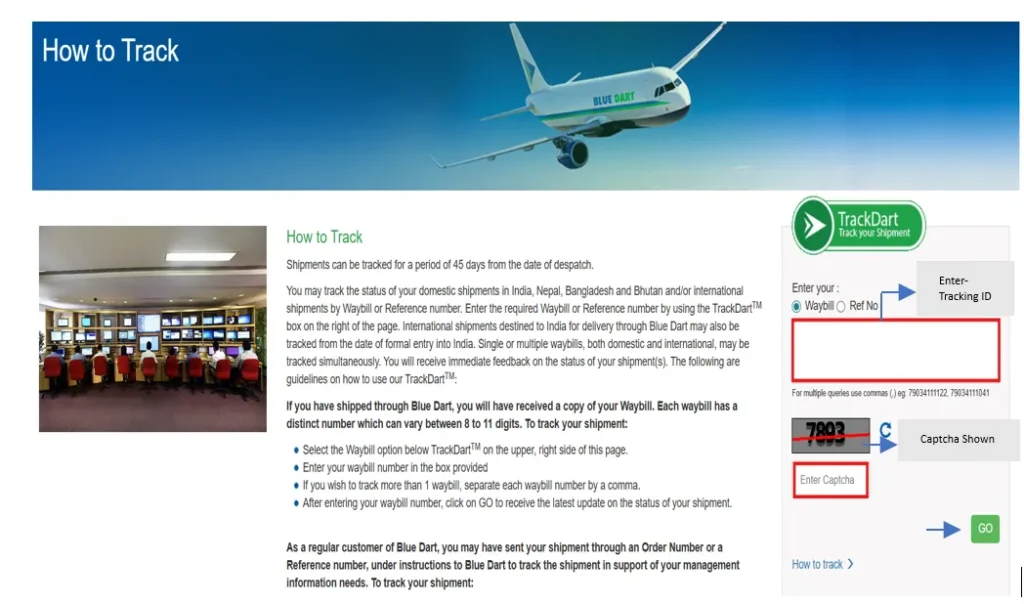
  • Track once every day
  • Be available at the POD when delivery is expected

📌 POD availability at the time of delivery is mandatory.

🔹 Step 2: Receive the Shipment Carefully

At the time of delivery:

Check each box carefully:

  • ✔ Box is sealed properly
  • ✔ No visible damage, hole, or tearing

If any box is damaged:

  • Inform the delivery person immediately
  • Inform the Apni Pathshala team by replying to the same email where tracking details were shared

Do not ignore visible damage.

🔹 Step 3: Record an Unboxing Video (Mandatory)

Before opening any box:

  • Start recording a video on your phone

The video must clearly show:

  • All boxes from outside
  • Opening of each box
  • All items inside (CPU, monitor, keyboard, mouse, accessories)

⚠️ This video acts as official proof in case of missing or damaged items.

🔹 Step 4: PC Setup After Delivery (Within 24 Hours)

After delivery:

  • Scogo will directly coordinate with the POD
  • All PCs must be installed and checked within 24 hours

During setup, the POD must:

  • Turn ON every PC
  • Check if all systems are working properly

If any issue is found:

  • Record a short video clearly showing the problem
  • Share it with the Scogo coordinator

🔹 Step 5: Issue Reporting Timeline (Within 48 Hours)

If any item is:

  • Missing
  • Damaged
  • Not working

It must be reported within 48 hours of delivery.

Important rules:

  • Reply in the same email thread where shipment details were shared
  • Report the same issue during coordination with Scogo

⚠️ If no issue is reported within 48 hours, the shipment will be considered complete and in good condition.

🔹 Step 6: QC (Quality Check) Report Verification & Sign-off

A QC form will be provided along with the shipment.

If the QC form is not received, inform Scogo immediately.

The POD must:

  • Test every PC and accessory
  • Tick all applicable checks in the QC form
  • Add remarks if any issue is observed
  • Sign the QC form
  • Apply POD stamp

The signed QC form must be shared with:

  • Scogo
  • Apni Pathshala team (for records and confirmation)

🔹 Step 7: Final Email Reply With All Files

Reply in the same email thread and attach:

  • 📎 Unboxing video
  • 📎 Signed QC report with POD stamp
  • 📎 Issue video (only if applicable)

Once all files are received, the team will review and guide you on next steps if required.

5. Important Guidelines (Must Follow)

  • ❗ Do not start a new email thread
  • ❗ Follow timelines strictly (24 hrs / 48 hrs)
  • ❗ Unboxing video is mandatory
  • ❗ QC form submission is compulsory
  • ❗ Incomplete reporting may delay resolution

6. Closing Note

Following this shipment and setup process ensures:

  • Accountability
  • Faster support
  • Smooth POD operations without confusion

Thank you for your cooperation in maintaining Apni Pathshala’s infrastructure standards.

How good did it answered your questions?

Share This Article :

  • Facebook
  • X
  • LinkedIn
  • Pinterest
Still stuck? How can we help?

Still stuck? How can we help?

Updated on January 17, 2026
Curriculum Assessment & Design for PODsHow to Raise a Hardware Complaint

Start Small.

Change Everything.

Open a POD in your area and light up young minds.

Start a POD
Talk To Us
Picture of ApniPathshala Logo Primary

ApniPathshala supports community leaders, parents, and educators in creating and running local learning centres or microschools by providing the guidance, resources, and ecosystem needed for sustainable, community-driven education.

Quick Links

  • POM (POD Operation Manual)
  • Blogs
  • About Us
  • Contact Us
  • Comics
  • Social Media
  • Terms & Conditions
  • Volunteering
  • Vacancies
  • POM (POD Operation Manual)
  • Blogs
  • About Us
  • Contact Us
  • Comics
  • Social Media
  • Terms & Conditions
  • Volunteering
  • Vacancies

Get our newsletter

2 mails every week. No spam.

Facebook Linkedin X-twitter Youtube Instagram Phone-alt Envelope

Founded by:

Dr.Aniruddha Malpani

Copyright © 2025 APNIPATHSHALA. All rights reserved.