Skip to content
Picture of ApniPathshala Logo Primary
  • Start A Pod
  • Pods
  • Apna PC
  • What We Do
    • Stories
    • Comics
    • Courses
  • Blogs
  • Live Map
  • Start A Pod
  • Pods
  • Apna PC
  • What We Do
    • Stories
    • Comics
    • Courses
  • Blogs
  • Live Map
What’s new
View all updates
Picture of ApniPathshala Logo Primary
What’s new
View all updates

Search

cancel

Notifications

  • Collaboration with NCSM
  • Read, How a small POD is changing lives
  • Read, Pros and Cons of Homeschooling
  • Read, Microschooling a new way to learn

Suggestions

Non - Profit PODs
Apna PC
POD Manual
How to start a POD?
What is a POD?
Mumbai
Delhi
What is a Microschool?
Instagram
Apply to open a POD

Follow Us:

Facebook X-twitter Youtube Instagram Phone-alt Envelope

Need Help?

  • How to Apply for a POD
  • What is Apni Pathshala?
  • Understanding the Incubation Phase
  • Weekly Responsibilities During Incubation
  • Monthly Responsibilities During Incubation
Picture of ApniPathshala Logo Primary
cancel
  • Home
  • Start A Pod
  • Pods
  • Apna PC
  • Blog
  • Comics
  • Courses
  • Dr. Malpani’s Insights
  • Student Stories
  • Live Map
  • About Us
  • Contact Us
  • Home
  • Start A Pod
  • Pods
  • Apna PC
  • Blog
  • Comics
  • Courses
  • Dr. Malpani’s Insights
  • Student Stories
  • Live Map
  • About Us
  • Contact Us
Facebook X-twitter Youtube Instagram Phone-alt Icon-email1

POD Operating Manual

Getting Started

  • How to Apply for a POD
  • What is Apni Pathshala?

POD Operations for POD Leaders

  • Student Data Management & Attendance Tracking
  • Managing POD Inventory & Equipment
  • How to Log Complaints & Request Tech Support
  • How to Manage Courses & Curriculum | POD Leader Guide
  • How to Submit Weekly Insights | POD Leader Guide
  • Complaint Submission
  • How to Fill Monthly Insights | POD Leader Guide | Apnipathshala POM
  • Skill Development Cluster
  •  Employment Cluster – Definition Structure
  • Digital Literacy Cluster – Definition Structure
  • Academic Empowerment Cluster Definition Structure
  • One-Year POD Standard (Aligned to AP Phases 0–3)  
  • Post-KYC Meeting with the POD
  • Software Testing Before POD Launch
  • New POD Applications (Complete, Priority-Arranged)
  • Curriculum Assessment & Design for PODs
  • Shipment, Delivery & PC Setup Guide
  • How to Raise a Hardware Complaint
  • Red Flags and Corrective Actions
  • Usefull Tools and Templates
  • Final Evaluation of Incubation
  • Core Evaluation Criteria
  • Monthly Responsibilities During Incubation
  • Understanding the Incubation Phase
  • Weekly Responsibilities During Incubation

ApniPrerna

  • Deleting Old or Unused User Accounts
  • Deleting Unwanted Applications
  • How to Create Student Login Credentials in Apni Prerna
  • How to Install Apni Prerna Software on a Windows PC
  • Installation of Apni Prerna on Linux PCs 

Software & Portal Guides

  • How to upload weekly report on VED
  • How to Fill Weekly Insights | POD Leader Guide
  • Success Stories | POD Leader Guide
  • Submit Student Success Stories Using Apni Pathshala VED
  • Configure Innovative Teaching Methods in Apni Pathshala VED
  • Complaints & Technical Support Management
  • Media Library & Digital Asset Management
  • Student Data Management & Learning Portal Sync
View Categories
  • Home
  • POD Operating Manual
  • POD Operations for POD Leaders
  • How to Manage Courses & Curriculum | POD Leader Guide

How to Manage Courses & Curriculum | POD Leader Guide

0:00 / 2:52
  • View as Markdown Open this page as plain Markdown (opens in a new tab)
  • Open in ChatGPT Ask questions about this page (opens in a new tab)
  • Open in Claude Ask questions about this page (opens in a new tab)
  • Open in Google AI Studio Ask questions about this page (Google account required) (opens in a new tab)

Apni Pathshala VED | Standard Operating Procedure
Version: v1.0
Effective Date: Aug 25, 2026
Target Audience: POD Leaders, Coordinators, & Trainers

Purpose

This SOP guides POD Leaders through browsing available Apni Pathshala curriculum options (12+ learning tracks), assigning courses to student batches, tracking course completion milestones, and requesting new curriculum materials or software modules.

System Access

  1. Navigate to the VED Portal: https://ved.apnipathshala.org.
  2. Log in using authorized credentials.
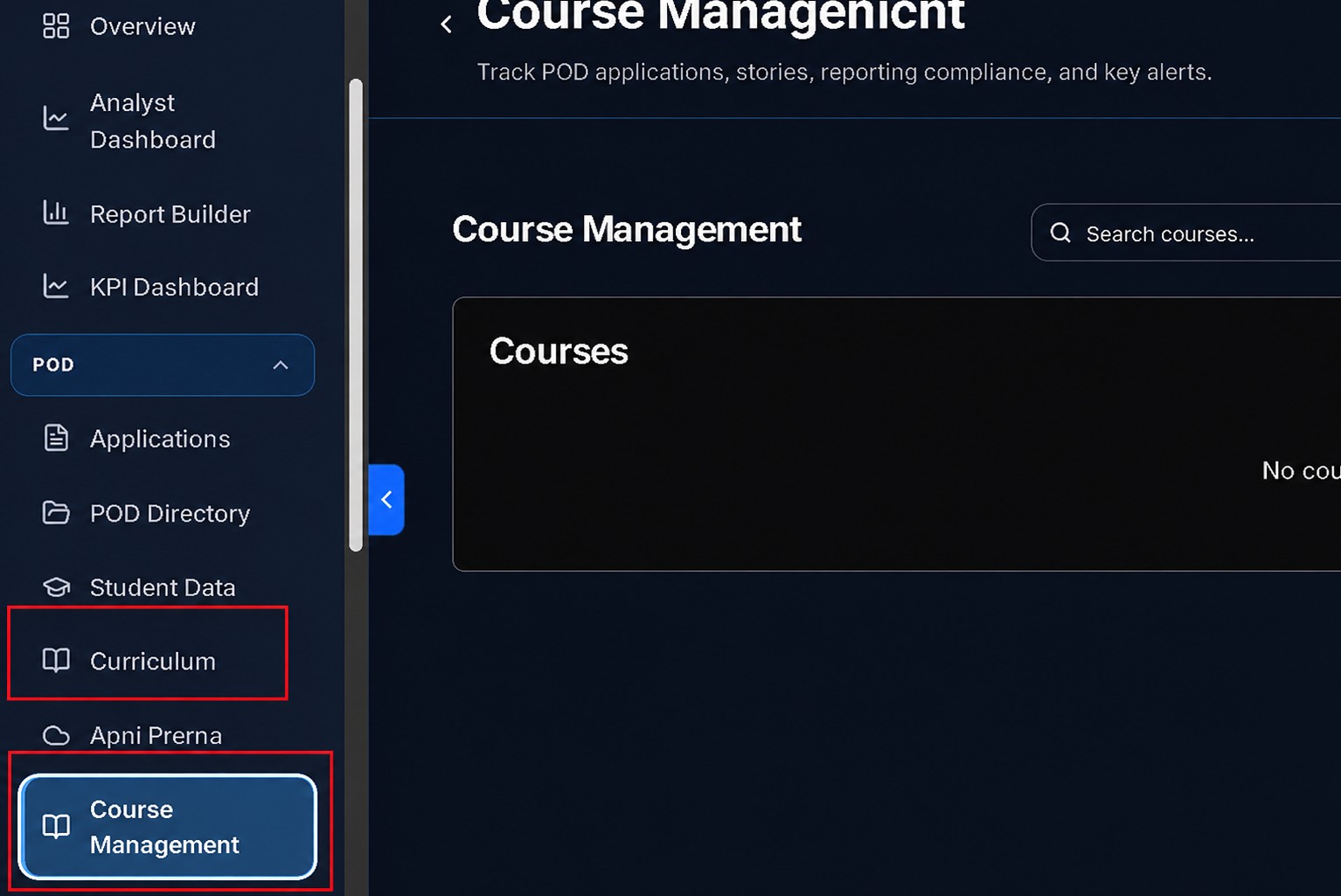
  3. From the left sidebar navigation under the Pod section, select Course Management or Curriculum.
Available Learning Tracks

Apni Pathshala offers approximately 12 different curriculum options across four core areas:

CategoryLearning Tracks
Digital Literacy FoundationBasic Computer Operations, Internet Safety, Google Workspace.
Office ProductivityTouch Typing (English/Hindi), MS Word, Excel, PowerPoint.
Creative & Graphic DesignCanva Graphic Design, Basic Video Editing.
Advanced & Career TrackAI Tools (ChatGPT, Gemini), Digital Marketing, Govt Exam Prep.

Workflow 1: Defining & Assigning Courses

Courses are the primary curriculum definitions used for student enrollment and impact reporting.

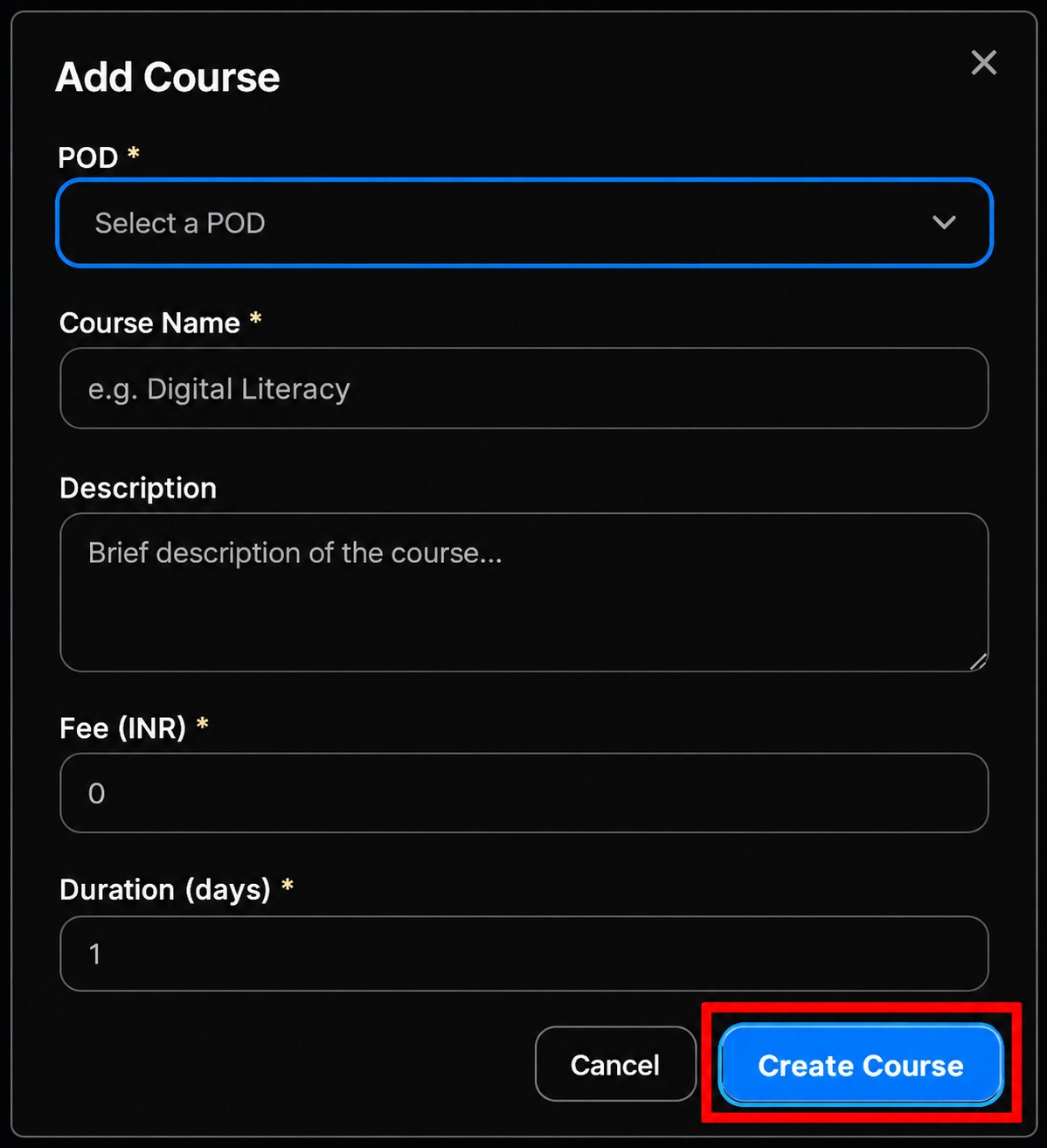
  1. Add New Course: Go to Course Management and click + Add Course.
    • Course Name: Clear and descriptive (e.g., ‘MS Office Basics’).
    • Fee: Enter the amount in INR (use 0 if the course is free).
    • Duration: Enter the total number of days (must be > 0).
  2. Assign to Batch:
    • Select Assign Course to Batch.
    • Identify the POD Name and the specific Batch (e.g., Morning Batch A).
    • Choose the Course Module from the catalog.
    • Set the Start Date and the Target Completion Date.
    • Click Confirm Assignment to automatically update student profiles in that batch.
Workflow 2: Implementing & Tracking Curriculum

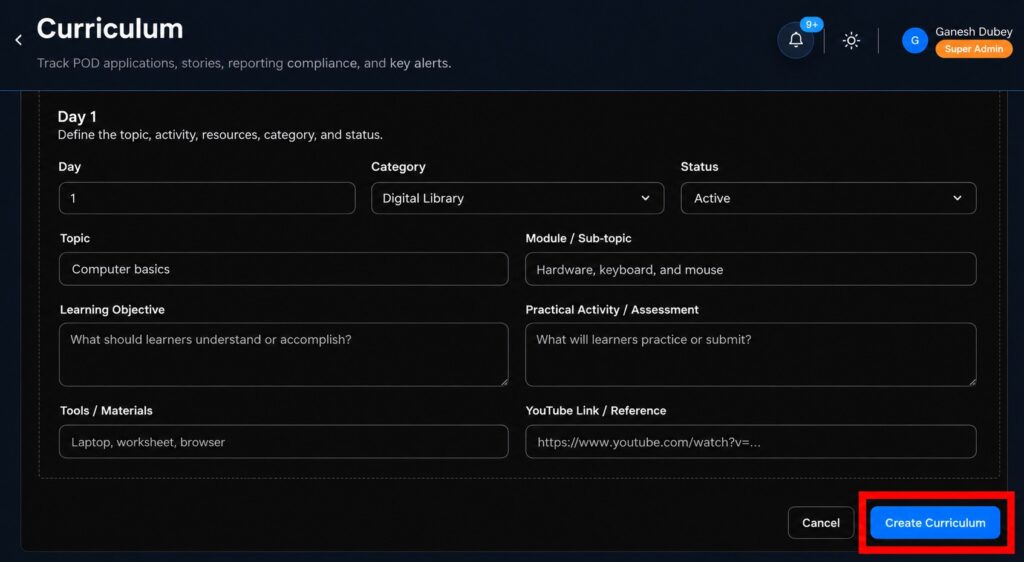
The Curriculum module provides a day-by-day teaching plan assigned by the Apni Pathshala curriculum team.

  1. Daily Preparation:
    • Review the next 5-6 days of the curriculum at the start of each week.
    • Check Learning Objectives to ensure you know what students should achieve.
    • Review any provided Reference Links (YouTube tutorials, guides) before class starts.
  2. Tracking Milestones: Navigate to Course Management $\rightarrow$ Course Progress.
    • In Progress: Student is actively participating in lessons.
    • Assessment Pending: Lessons finished; awaiting practical test score.
    • Completed: Final practical test passed with a score > 70%.
  3. Issuing Certificates: Once a student meets all requirements, click Issue Certificate to generate a digital PDF containing the student’s name and POD details.
Workflow 3: Requesting Materials & Support

If a required curriculum is not currently assigned to your POD, you must request it formally.

  1. Via Weekly Insights: Use Section 3 (“Curriculum Request / Feedback”) to describe your specific needs.
  2. Detail Requirements: Specify the course name, number of students, and required format (e.g., Printed Worksheets, LMS Unlocks).
  3. Resolution: The central team typically reviews and dispatches materials within 3–5 business days.

Common Mistakes to Avoid

  • Skipping Prerequisites: Ensure students complete Basic Digital Literacy before moving to AI Tools or Canva.
  • Ad-hoc Teaching: Avoid teaching only what you know; follow the day-by-day plan to ensure consistency across PODs.
  • Duplicate Entries: Always search for an existing course name before adding a new one.
  • Incomplete Records: Certificates cannot be issued without a verified test score recorded in VED.

Support

  • Technical Assistance: Use the Request Support Call button on the VED portal.
  • Operational Queries: Contact your assigned POD Manager via the Complaints & Issues module.
How good did it answered your questions?

Share This Article :

  • Facebook
  • X
  • LinkedIn
  • Pinterest
Still stuck? How can we help?

Still stuck? How can we help?

Updated on October 15, 2026
How to Log Complaints & Request Tech SupportHow to Submit Weekly Insights | POD Leader Guide

Start Small.

Change Everything.

Open a POD in your area and light up young minds.

Start a POD
Talk To Us
Picture of ApniPathshala Logo Primary

ApniPathshala supports community leaders, parents, and educators in creating and running local learning centres or microschools by providing the guidance, resources, and ecosystem needed for sustainable, community-driven education.

Quick Links

  • Blogs
  • About Us
  • Contact Us
  • Comics
  • Social Media
  • Terms & Conditions
  • Volunteering
  • Vacancies
  • Live Map
  • Blogs
  • About Us
  • Contact Us
  • Comics
  • Social Media
  • Terms & Conditions
  • Volunteering
  • Vacancies
  • Live Map

Get our newsletter

2 mails every week. No spam.

Facebook Linkedin X-twitter Youtube Instagram Phone-alt Envelope

Founded by:

Dr.Aniruddha Malpani

Copyright © 2025 APNIPATHSHALA. All rights reserved.