
1. Overview
This guide explains the standard process PODs must follow after receiving PC shipment details, including tracking, delivery checks, unboxing, setup, issue reporting, and final confirmation.
Following this SOP ensures:
- Safe receipt of hardware
- Timely installation and verification
- Clear accountability for missing or faulty items
- Smooth coordination with Apni Pathshala and Scogo teams
2. Who This Guide Is For
- POD Leaders
- POD Coordinators
- Parents managing POD infrastructure
3. Responsibility Ownership
- Shipment & Setup Coordination: Apni Pathshala Computer Team & Scogo
- On-ground Verification & Reporting: POD Team
4. Step-by-Step Shipment & Setup Process
🔹 Step 1: Track the Shipment Daily
Once the shipment is dispatched:
- You will receive an email containing the tracking number and tracking link
- Open the link and check the shipment status
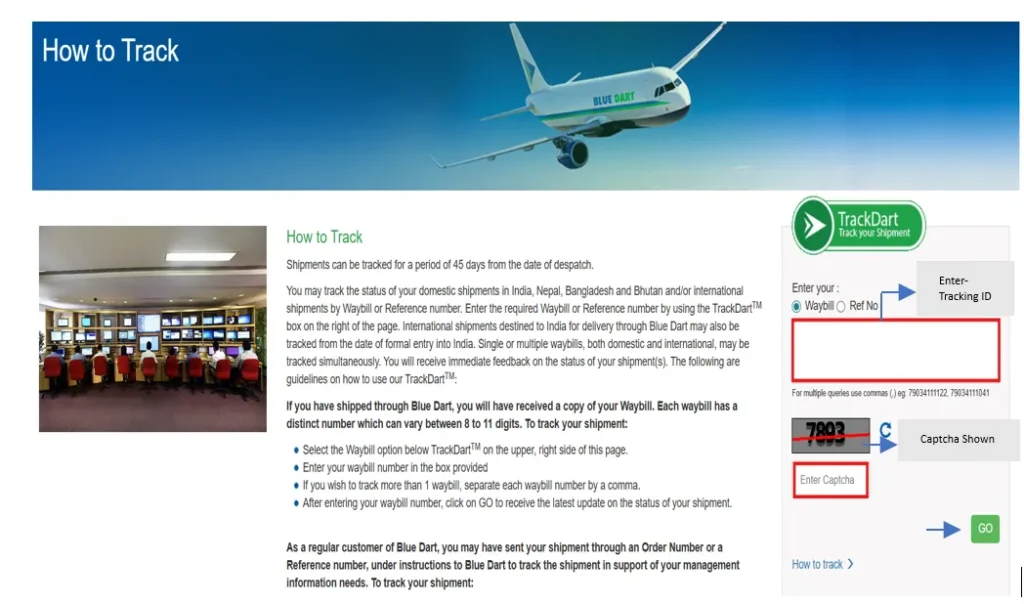
- Track once every day
- Be available at the POD when delivery is expected
📌 POD availability at the time of delivery is mandatory.
🔹 Step 2: Receive the Shipment Carefully
At the time of delivery:
Check each box carefully:
- ✔ Box is sealed properly
- ✔ No visible damage, hole, or tearing
If any box is damaged:
- Inform the delivery person immediately
- Inform the Apni Pathshala team by replying to the same email where tracking details were shared
Do not ignore visible damage.
🔹 Step 3: Record an Unboxing Video (Mandatory)
Before opening any box:
- Start recording a video on your phone
The video must clearly show:
- All boxes from outside
- Opening of each box
- All items inside (CPU, monitor, keyboard, mouse, accessories)
⚠️ This video acts as official proof in case of missing or damaged items.
🔹 Step 4: PC Setup After Delivery (Within 24 Hours)
After delivery:
- Scogo will directly coordinate with the POD
- All PCs must be installed and checked within 24 hours
During setup, the POD must:
- Turn ON every PC
- Check if all systems are working properly
If any issue is found:
- Record a short video clearly showing the problem
- Share it with the Scogo coordinator
🔹 Step 5: Issue Reporting Timeline (Within 48 Hours)
If any item is:
- Missing
- Damaged
- Not working
It must be reported within 48 hours of delivery.
Important rules:
- Reply in the same email thread where shipment details were shared
- Report the same issue during coordination with Scogo
⚠️ If no issue is reported within 48 hours, the shipment will be considered complete and in good condition.
🔹 Step 6: QC (Quality Check) Report Verification & Sign-off
A QC form will be provided along with the shipment.
If the QC form is not received, inform Scogo immediately.
The POD must:
- Test every PC and accessory
- Tick all applicable checks in the QC form
- Add remarks if any issue is observed
- Sign the QC form
- Apply POD stamp
The signed QC form must be shared with:
- Scogo
- Apni Pathshala team (for records and confirmation)
🔹 Step 7: Final Email Reply With All Files
Reply in the same email thread and attach:
- 📎 Unboxing video
- 📎 Signed QC report with POD stamp
- 📎 Issue video (only if applicable)
Once all files are received, the team will review and guide you on next steps if required.
5. Important Guidelines (Must Follow)
- ❗ Do not start a new email thread
- ❗ Follow timelines strictly (24 hrs / 48 hrs)
- ❗ Unboxing video is mandatory
- ❗ QC form submission is compulsory
- ❗ Incomplete reporting may delay resolution
6. Closing Note
Following this shipment and setup process ensures:
- Accountability
- Faster support
- Smooth POD operations without confusion
Thank you for your cooperation in maintaining Apni Pathshala’s infrastructure standards.


