Start a POD in Your Area

Bring Digital Classrooms to Life in Your Community

Partner with Apni Pathshala and start a fully supported digital centre for your community.

WANT TO OPEN A NEW APNI PATHSHALA POD

Open a local digital classroom with Apna PC, safe software, and mentorship. Help students in your community build real skills. Learn about eligibility and benefits.

Physical Space & Setup

Connectivity & Infrastructure

People & Safety

What is a POD?

A POD (Point of Digital Learning) is a small digital learning center set up in a local community by individuals, schools, or NGOs, with support from Apni Pathshala. Each POD is equipped with Apna PC computers and easy-to-use learning tools that help students learn computer basics, creativity, communication, and coding.

Apni Pathshala supports POD leaders by providing training, technology, and continuous guidance. The aim is to help local educators and changemakers bring quality digital education to students in their own communities whether in big cities like Mumbai and Delhi or in smaller towns and villages across India.

Who Can Start a POD ?

 If you believe in simple, practical, community-based learning, we can build with you.

SCHOOLS

We partner with government and private schools to provide digital skills training using simple tools and guidance, making traditional learning more engaging.

Non-Profit

We partner with local Non-Profit to deliver free digital learning in underserved areas and offer low-cost options for students through minimal fees.

INDIVIDUALS

We support individuals who are passionate about teaching and ready to lead PODs, helping them bring quality digital education to their communities.

OTHERS

We are prepared to assist anyone who is committed to providing digital literacy in their community by providing Apna PC and dedicated support.

How the POD Application Process Works

This is a simple step-by-step process to help you start your POD.

1.

Fill the Application Form

Submit your basic details, such as location, purpose, and available setup.

3.

Proposal & Plan Submission

Submit your detailed plan, including students, vision, and learning goals.

5.

Online Meeting with Team

Attend a discussion to explain your plan, approach, and impact.

7.

Approval & MoU Signing

Once approved, sign the MoU to confirm your POD partnership.

9.

Progress Tracking & Approval

Your POD status is tracked internally. Once all requirements are met, your application moves toward final approval.

11.

Computer Delivery & Quality Check

Once systems are delivered, unbox them, check functionality, and submit a QC report within 24 to 48 hours to confirm everything is working properly.

2.

Team Review & Shortlisting

Our team reviews your application and shortlists suitable candidates.

4.

Introduction Video & KYC

Share a short introduction video and complete required document verification.

6.

Lab Setup & Verification

Prepare your learning space and share proof of setup for final checks.

8.

Computer Delivery & Start POD

Receive systems, complete setup, and begin teaching students.

10.

MoU Signing

After approval, an MoU is shared. Review, sign, and return it without modifying any clauses to officially confirm the partnership.

1.

Fill the Application Form

Submit the online “Start a POD” form with your basic details like name, location, purpose, and available facilities. This helps us understand your intent and readiness.

2.

Application Review by Team

Our team reviews your submitted form. If any details are missing or unclear, we will contact you via email or phone for clarification.

3.

Shortlisting & Batch Review

Applications are reviewed in weekly batches. If selected, you will move forward in the process; otherwise, you may be placed on hold or informed accordingly.

4.

Proposal Submission

If shortlisted, you will receive a proposal document. Fill in details about your vision, students, training plan, and long-term goals within the given timeline.

5.

Demo Introduction Video

Submit a 3–5 minute video introducing yourself, your community, and why you want to open a POD. This helps us understand your motivation and impact plan.

6.

KYC Verification

Provide required KYC documents such as Aadhaar, address proof, and NGO registration (if applicable). This step ensures authenticity and compliance.

7.

Online Verification Meeting

Attend a Google Meet with our team to discuss your POD plan, teaching approach, student impact, and future roadmap.

8.

Lab Setup Confirmation

Prepare the physical lab setup (tables, chairs, power, safety). Share a short video of the completed setup for final verification.

9.

Progress Tracking & Approval

Your POD status is tracked internally. Once all requirements are met, your application moves toward final approval.

10.

MoU Signing

After approval, an MoU is shared. Review, sign, and return it without modifying any clauses to officially confirm the partnership.

11.

Computer Delivery & Quality Check

Once systems are delivered, unbox them, check functionality, and submit a QC report within 24 to 48 hours to confirm everything is working properly.

Tap to interact
Double tap to interact
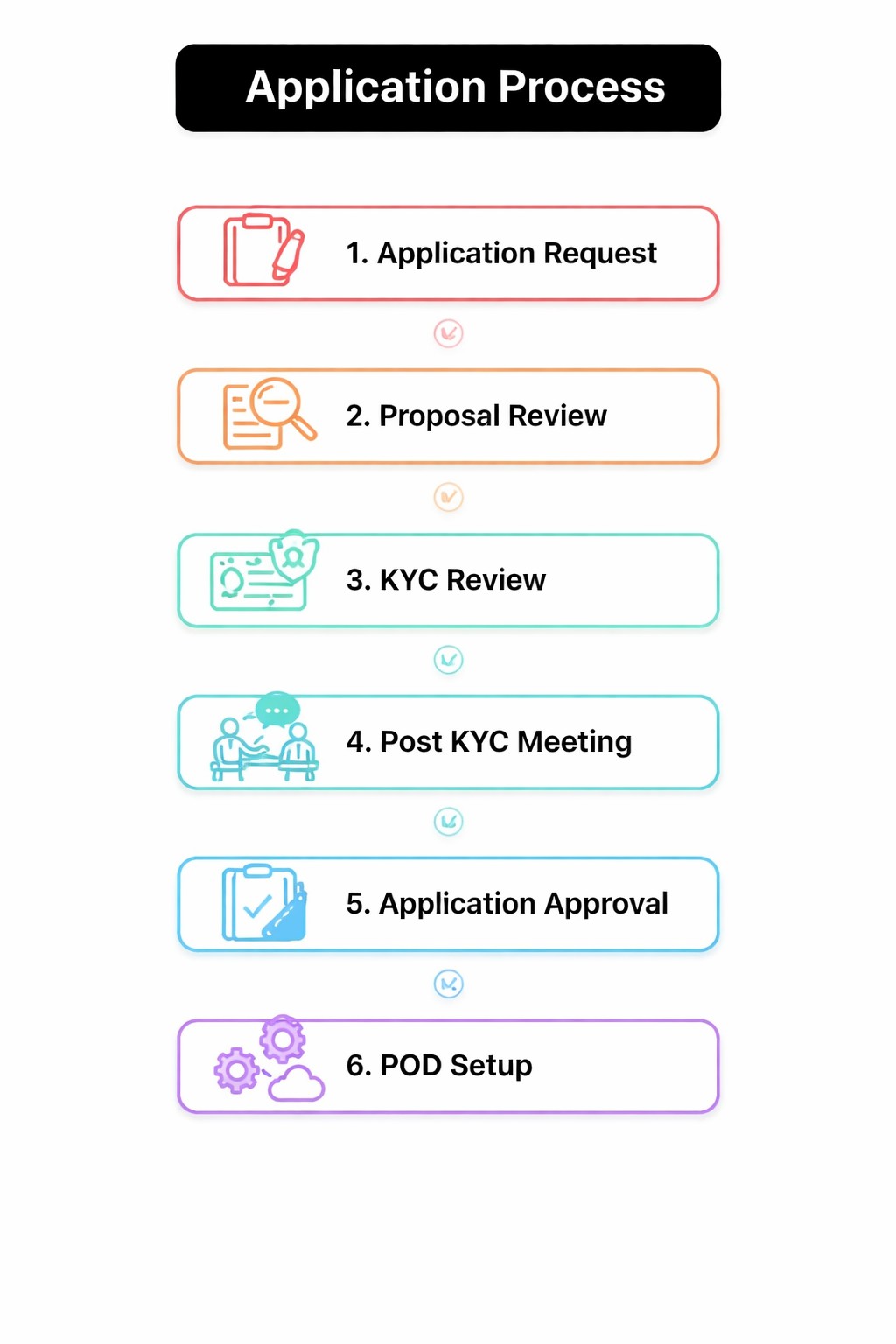
Application Process

Adopt A POD

Adopt A Pod

The POD Adoption Program enables anyone to sponsor a digital classroom, giving underprivileged students access to computers, digital learning, and brighter future opportunities.


OUR PODS

We aim to launch 1,000+ PODs to reach 1.5 lakh+ students. You can help by referring anyone interested in starting a digital learning centre or by partnering with us to scale digital education in India.

1

Number of PODs across India.

9000

Employment Generated

1000

Academic Improvement of students

1

States / UT Covered

TESTIMONIALS

Real Stories from the Ground

These are real stories from across India that show how digital learning is changing students’ lives.

FREQUENTLY ASKED QUESTION

Who can join Apni Pathshala programs?

Anyone can apply, including individuals, NGOs, and schools. The only requirement is that the applicant must be credible and genuinely interested in fostering students’ growth through digital learning.

Fill out the application form. Your application will be reviewed within 3–5 business days. If shortlisted, you’ll be guided through the next steps.

You need a proper space, internet connection, and a local tech expert. All details are listed above on this page. Please check them before applying.

You’ll receive 10 fully equipped computers with all necessary accessories to run your POD. In return, you must follow our learning plan, share regular updates, and create a safe and welcoming space for students.
For detailed PC specifications, visit the Apna PC page

No, we do not charge anything to run a POD, even if it starts earning money.
However, we encourage you to support at least 10 students a year who cannot afford the fee, though this is not mandatory.

No. The PCs are given on a 15-month lease through a signed MoU. After the lease ends, the agreement needs to be renewed to continue using the PCs. Read the full Terms & Conditions here